Guide
How to play Kero Blaster
Where to buy


PC requirements
Can your PC run Kero Blaster?
- Minimum RAM:
- 1 GB
- Minimum graphics:
- 800 x 600 VRAM 256MByte
- Minimum storage:
- 50 MB
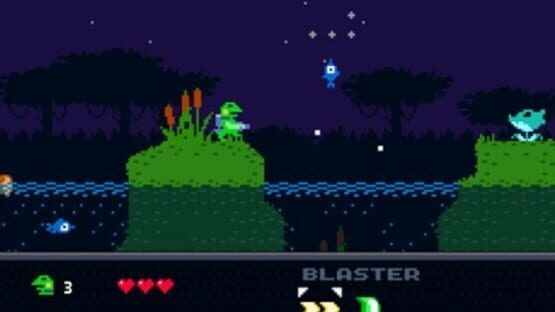
Created by Daisuke "Pixel" Amaya, the mind behind Cave Story, Kero Blaster is a platform shooter. Set in a sci-fi world with a pixel art look, it puts you in the shoes of a frog who works for a teleportation company called Cat & Frog. Your job is to clear the facilities of strange black creatures that have invaded the teleporters. What sets it apart is its focus on precise shooting and its frantic pace, combined with the production quality and level design its creator is known for.
The gameplay is a classic side-scrolling shooter with straightforward controls: move, jump, shoot and switch weapons. In a typical run, you move through linear stages packed with enemies that you have to take down while dodging their attacks. The shooting system lets you hold the button to keep firing in the direction you were aiming when you started, which adds a strategic layer to combat. The difficulty ramps up gradually, with challenges that demand both quick reflexes and knowledge of enemy patterns.

When you start the game, it's important to get comfortable with the basic controls and how the character feels in motion. Spend some time practicing jumping and shooting at the same time, since that combination is essential to survive. Watch the attack patterns of the common enemies and learn to tell when it's safe to move forward and when you need to fall back. In the first few hours, focus on finishing the stages without worrying too much about getting the highest score.
To make progress, you need to understand the weapon system, which lets you switch between different types of shots depending on the situation. Some weapons work better against certain enemies, so try out every option available. Also pay attention to the temporary power-ups that can boost your firepower or give you special abilities. Managing your position on screen is crucial, since keeping a good distance from enemies gives you more time to react.

Common beginner mistakes include standing still for too long, which makes you an easy target, and not switching weapons when the situation calls for it. Another mistake is underestimating how important precise jumps are, since many enemy attacks can be dodged with a well-timed jump. Also avoid focusing too much on killing every enemy; sometimes it's better to push forward quickly so you don't get overwhelmed.
To get further, try to memorize the enemy patterns and the power-up positions in each stage. That lets you plan your moves ahead of time. Keep a safe distance from bosses, learning their attack phases and when it's time to counterattack. Don't get frustrated if you die over and over; dying is part of learning in this kind of game.

Kero Blaster is for players who enjoy classic shooters with a real challenge, especially those who appreciate pixel art games and precise controls. If you like titles such as Contra or the early Castlevania games, you'll probably find this one very appealing. It's also a good pick if you want a short but intense experience, with a difficulty curve that demands practice but feels fair.
Kero Blaster came out on 11 de mayo de 2014. Platforms, genres and ratings are on the Kero Blaster game page.
Related games


Last updated: 23 de noviembre de 2026.
Powered by PairProgramming · custom software development, AI and automation.