Guide
How to play Portal
Where to buy


The story begins when the protagonist, Chell, wakes up inside an apparently empty laboratory called Aperture Science Enrichment Center. An artificial intelligence system named GLaDOS guides her through a series of test chambers, promising cake as a reward. What sets this game apart is the portal gun, which creates two connected surfaces of different colors that let Chell and simple objects travel between them, combining puzzle logic with the physics of movement and conservation of momentum.
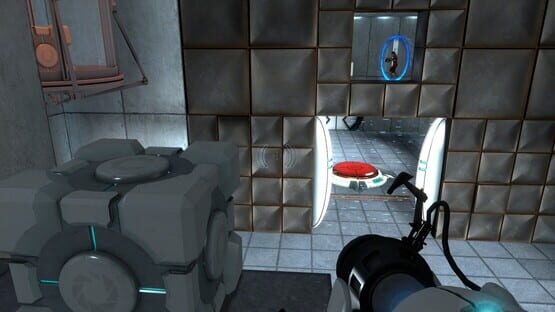
The game is played in first person and blends adventure, platforming, and puzzle elements. A typical session involves entering a chamber, studying the environment, placing both ends of a portal, and figuring out how to reach the goal, which is usually an exit plate. The portal gun is the only weapon available. Its two colors, orange and blue, form a single connection that carries anything passing through it, with no distinction between entrance and exit. The Source engine's physics preserve speed when crossing portals, which makes it possible to launch Chell or objects over great distances and redirect movement using angled surfaces.

When you start the game, the most useful thing is to take some time getting comfortable with the portal gun's controls and how portals appear on screen. During the first hour, it's worth experimenting by placing the two ends on different surfaces, watching how your speed carries over, and trying to launch cubes and Chell herself. Pay attention to GLaDOS's messages too, since they often tell you when a portal can't be placed on certain materials, such as glass, or in areas that are too small. Learning to recognize the “Fizzlers,” the grates that deactivate portals, will save you from wasting time trying to place a portal where it won't work.
To progress, you need to understand three basic systems: conservation of momentum, interaction with moving objects, and dealing with Fizzlers. Conservation of momentum means that when you fall and enter a portal placed low, your speed is kept when you exit through the other end, which lets you cross large gaps. Objects like cubes can be launched through portals to press buttons or serve as temporary platforms. Finally, Fizzlers block any portal that tries to pass through them, so you'll need to go around them or use launch mechanics to get past without touching the grate.

Beginners often make mistakes like placing portals on surfaces that won't accept them, which makes them vanish with no effect. Another common error is trying to launch Chell without building up enough speed, which leads to falls that don't reach the goal. To avoid these mistakes, watch the surface color as you aim, look for a flat or slightly angled area that allows placement, and practice jumping and falling before attempting a long launch. Don't underestimate cubes, either. Sometimes the simplest solution is to set a cube on a button before creating your portals.
Among the most useful tips is planning the position of both ends before you shoot, so the resulting trajectory is the one you want. Using the opposite wall to redirect your speed lets you reach high areas without multiple attempts. When you face a trap with turrets or energy balls, placing a portal behind the threat can deflect the projectile and create a safe path. Staying calm and studying the environment before acting cuts down on failed attempts, which speeds up your progress and spares you the frustration of dying quickly.

The game is aimed at players who enjoy mental challenges, prefer thinking to frantic action, and appreciate subtle storytelling with dark humor. Players who love physics-based puzzles, enjoy experimenting with novel mechanics, and don't mind a gradual learning curve will find Portal rewarding and memorable.
Portal came out on 10 de octubre de 2007. Platforms, genres and ratings are on the Portal game page.
Related games



Last updated: 6 de noviembre de 2026.
Powered by PairProgramming · custom software development, AI and automation.